Showing posts with label Properties Palette. Show all posts

Monday, July 31, 2023

Dept of Subtle - Select Everything in a Property's Field

Sharing this because someone observed me selecting a parameter value and was curious about how I selected everything. If they didn't know...maybe you don't either?

When you just click in a parameter field in the Properties Palette or Type Properties dialog the cursor will usually land where you click. You can use Home or End keys to move the cursor to beginning or end of the entry. You can also use the CTRL + A button to select everything in the field.

If you want to select all of (with the cursor) what is entered, in order to replace it entirely, this is very subtle...
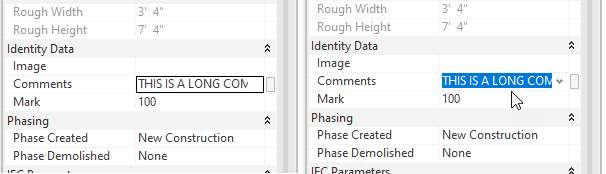
When you move your cursor over the field, as you click...drag the cursor arrow down (or up) away from or out of the field. Done correctly it will select everything in the field. Once familiar with the motion it is quite easy to do.

Originally I realized that clicking in a field past the end of the entry (in empty space) would select everything. That was useful to me but the width of the field is usually not wide enough to do that every time. Yet, every now and then when I clicked in a field I'd select everything. Eventually I took time to notice why it was happening. Happy selecting?!

Monday, December 30, 2019

UnHelpful Help Location URL

I read about quirky Reviteristic issue at RFO this afternoon. A weird graphics glitch occurs when we interact with the Help Icon families that use the URL parameter feature to reference an external document. This is an example of it in the sample architecture model that ships with Revit (rac_basic_sample_project.rvt - in imperial content).


When we select the icon and examine its properties we get this Learning Link parameter.


When we click in the field the small button appears with the ellipsis icon. Clicking on the that button will take us to the URL saved in family.


The trouble begins after we move our cursor away from the field and start to resume work. The URL is stuck on screen over another parameter like below, the Detail Number parameter for the view.


I noticed that I can work past the issue if I click in the Default Analysis Display Style field, which I presume works because it also has an navigation/ellipsis style button.


I also noticed that if I am careful to click on the field right above the Learning Link, called Location, before leaving the Properties Palette I can avoid the issue too.


The forum thread was talking about this in 2019 but these images are from 2020.2. 

Wednesday, February 01, 2017

Properties Palette and Project Browser are not Responsive

This issue tracks back at least a couple of years now but I've just been asked about it again the other day. People report that on occasion Revit refuses to acknowledge when you click on either the Project Browser or Properties Palettes. For example this thread at Autodesk's User Forum began in February 2014.

The suggested methods, in the thread, for fixing this issue include: Using Save As, Disabling Hardware Acceleration and clicking on the Help icon. One person posted that their screen went black first and then Revit crashed. That bit sounds like a graphics card/driver could be involved.

Those fixes resolved the situation but don't tell us specifically why it happened in the first place. Since it has not happened to me personally I can't say for sure why it happens either. I have heard that some errors generate a warning message that can get lost behind the Revit UI. Using ALT + Tab will allow you to cycle between open windows (applications) and you may find a message dialog lurking there. I wouldn't expect any part of Revit to be responsive as such. Interesting that users find that they can access the Help and Application menu (Big R) items despite the two windows being inaccessible.

Perhaps a reader has isolated the cause?

Sunday, December 13, 2015

Oh Project Browser and Properties Palette Where Art Thou

It is easy to close the Project Browser and Properties Palette, just click the little X in the top right corner of each window.


It is a little less obvious how to restore them. The formal Front Door is via the View ribbon tab > Windows panel > User Interface.


A bit less obvious is the access to Browsers via the right-click context menu, for the Project Browser at least.


I'm sure you noticed that the Properties Palette can be restored via the right-click context menu too.


It is also available on the Modify ribbon tab > Properties panel > Properties.


The Properties Palette also has two keyboard shortcuts: PP and CTRL+1, at least that's true of my configuration (stock install). There isn't one assigned to the Project Browser but we could opt to do that too.

Oh, Revit MEP users can close and open their System Browser with F9 as well as access it in the same way the Project Browser can be (described above).

Tuesday, July 29, 2014

Dockable Windows

Revit has supported docking the Project Browser, Properties Palette, System Browser(for MEP) and Reconcile Hosting for a few releases now. I find new users often struggle with the actual task of docking them because the UI interaction isn't entirely intuitive. There are graphic cues offered but users don't seem to recognize them right away. I find I have to make a point of stressing that the location of the cursor is paramount and that while they should be looking for the visual cues, the cursor is what drives them.

I made this short video (Two Minutes) to help capture the subtlety I'm talking about.


While I am at it, personally I find Reconcile Hosting hard to find. It has a button on the Collaborate ribbon > Coordinate panel but I also expect it to be lurking on the View ribbon > User Interface. That's because the Properties Palette, Project Browser and System Browser are there and Reconcile Hosting is the same sort of thing. At least I think so since it can be docked among the others. I also find it quirky that, since there is a button for Reconcile Hosting, there isn't a button for the System Browser on the Systems and/or Analyze ribbons.

Tuesday, June 10, 2014

Revit INI Tweak and Properties Palette Apply Behavior

Courtesy of Aaron Maller the other day...

Aaron said, in a conversation about the Apply behavior of the Properties Palette:

You guys know you can edit that with a setting in the INI file, right?

He offered this explanation:

Within the [UserInterface] section of the Revit.ini (see image), add the line:

DisableMppAutoApply=1


When you move your mouse out of the Properties Palette Revit will no longer commit changes you make. They (the Factory) quietly changed the way this INI key worked, between versions 2013 and 2014. In 2013, if you did this you HAD to use the Apply button to commit your change(s). In 2014 moving your mouse out of the Properties Palette will NOT commit your change(s). When you CLICK in the viewport, or elsewhere, Revit then commits the changes. The same is true in 2015 too.

That's SUBTLE and NICE! Thanks for the tip Aaron!

Sunday, November 24, 2013

Revit 2014 User Interface is Forgetful

I didn't notice this when 2014 was first released but since the last two web updates Revit seems to be forgetful about the Project Browser and Properties Palette status. I find that I can work for awhile, close Revit and return to find the palette and browser aren't open. When I examine their settings via View ribbon > User Interface the check marks indicate that Revit "thinks" they are open but they aren't "there". If I "close" them by un-checking and then check them again they come back.

I do find it is less forgetful if I allow the Recent Files list to open. There is an option to disable it in the Options Dialog (User Interface section), "Enable Recent files page at startup". If I disable it however I find that the palette and browser linger on screen when I close projects and families which gives the appearance that the project is still open because it will still display information that is part of the last project.

I've visited a few clients suffering with this and have heard from friends as well. It seems related to the new dockable browser API and it's messing with a couple external applications too apparently. If you are encountering this, you aren't alone. Hopefully they'll sort it out and issue another web update or perhaps a Hotfix to sort it out sooner than later.