Showing posts with label Trick. Show all posts

Monday, July 31, 2023

Dept of Subtle - Select Everything in a Property's Field

Sharing this because someone observed me selecting a parameter value and was curious about how I selected everything. If they didn't know...maybe you don't either?

When you just click in a parameter field in the Properties Palette or Type Properties dialog the cursor will usually land where you click. You can use Home or End keys to move the cursor to beginning or end of the entry. You can also use the CTRL + A button to select everything in the field.

If you want to select all of (with the cursor) what is entered, in order to replace it entirely, this is very subtle...
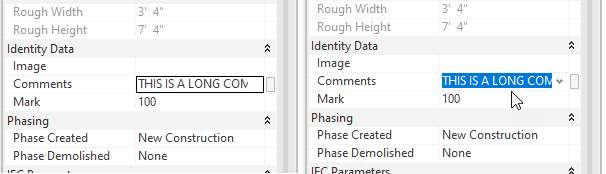
When you move your cursor over the field, as you click...drag the cursor arrow down (or up) away from or out of the field. Done correctly it will select everything in the field. Once familiar with the motion it is quite easy to do.

Originally I realized that clicking in a field past the end of the entry (in empty space) would select everything. That was useful to me but the width of the field is usually not wide enough to do that every time. Yet, every now and then when I clicked in a field I'd select everything. Eventually I took time to notice why it was happening. Happy selecting?!

Monday, October 08, 2018

Change a System Parameter from Type to Instance - Not Length

It is fairly common knowledge that we can change a built-in parameter like Width from Type to Instance by going through the side door, selecting a dimension assigned to the parameter and changing it to Instance on the ribbon (see the image).


Kurt Thompson wrote to me to share how he gets around this issue when the parameter isn't something a dimension can be associated with. Specifically he was referring to a thread at the Autodesk User Forums where a member (electrical focus) was asking Autodesk to change the default parameters for Mains (instance), MCB Rating (type) and Subfeed Lugs (type). They argue that each parameter should be the opposite of the current configuration based on how the information is really dealt with (not that he needs me to, but I agree with him).

Kurt writes:
"To change a System Type parameter to Instance...(specific to the mentioned thread)

Create a Shared Parameter built exactly like the built-in parameter you need to change but make it Instance instead of Type. Starting out with a Generic Model family, add the new parameter. Now assign the family to the category Electrical Equipment, Revit will replace the shared parameter with the built-in parameter but it will retain the Instance (or Type) property setting from the shared parameter. Give it a try."
Thanks Kurt!