Showing posts with label Schedule. Show all posts

Monday, July 31, 2023

Dept of Subtle - Select Everything in a Property's Field

Sharing this because someone observed me selecting a parameter value and was curious about how I selected everything. If they didn't know...maybe you don't either?

When you just click in a parameter field in the Properties Palette or Type Properties dialog the cursor will usually land where you click. You can use Home or End keys to move the cursor to beginning or end of the entry. You can also use the CTRL + A button to select everything in the field.

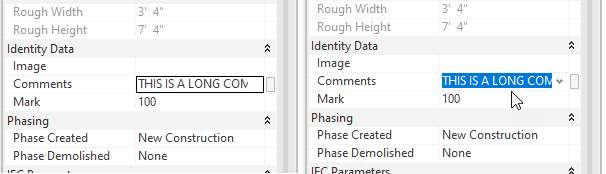
If you want to select all of (with the cursor) what is entered, in order to replace it entirely, this is very subtle...

When you move your cursor over the field, as you click...drag the cursor arrow down (or up) away from or out of the field. Done correctly it will select everything in the field. Once familiar with the motion it is quite easy to do.

Originally I realized that clicking in a field past the end of the entry (in empty space) would select everything. That was useful to me but the width of the field is usually not wide enough to do that every time. Yet, every now and then when I clicked in a field I'd select everything. Eventually I took time to notice why it was happening. Happy selecting?!

Saturday, March 13, 2021

Large Extents -Can't Navigate in a View and-or View Will Only Show Wireframe

I've written about Revit's fussiness regarding large extents numerous times over the years. In some of those posts I mentioned a related view issue. A view that refuses to show the model in anything other than wireframe is a symptom of the large extent issue.

I recently encountered a project that didn't have any DWG files to blame for it. Not only did the view not show according to graphic style settings it didn't allow navigation of any sort. The view was frozen. We could open or close it but nothing else. I noticed I could use a crossing selection window but then using Filter to focus my troubleshooting effort was still too coarse.

I've been meaning to mention how much I like IDEATE Explorer (IE). It has been very useful to examine projects and track down issues. It permits examining a model in ways that Revit can't. for example, I can select a category of elements or instances of each family/type within the category.

I use it routinely to check for excess DWG imports (resulting from exploded DWG content), workset assignment, reviewing warnings (more effectively than Revit's own), phase assignment/usage, content naming/usage and resolve line style usage (and more).

After using the crossing selection window in various parts of the view I realized some structural elements seemed quite far apart. Keep in mind the view was a white screen of nothing...imagining gazing toward Earth from Mars and trying to pick out where California is or my house. The Project Base Point and Survey Point didn't even show up in the view.

I started with trying to isolate where in this vast white space the structural element was but no matter what I tried I seemed to always select some structural framing.

Once I knew which category to hunt in I used IE to look at individual framing elements. I found a single framing (W Beam) was 2+ million feet long. I expected to find a family very far away, not one that was just very long. I realized that a Structural Framing schedule could have revealed this element too, if I knew which category and to look at Length. I did make a schedule just to see if I missed any other really long framing.

One Beam, one verrrrry looonnng beam killed any view it was visible in. 3D views are where we were confronted with the problem but other views whose extent permitted the beam's true extent to affect the view were also victimized. In the end we rolled the project back to just prior to the beam being added. 

The views didn't "recover" from the harm when the offending beam was deleted. I surmise other aspects of the model were altered by the extent of the beam, perhaps scope boxes, crop boundaries, a connected or joined element...not sure. That will remain a mystery.

May your troubleshooting be quick, effective and "trouble" free.
Monday, December 04, 2017

Consulting Work - December and January Schedule

I've been very fortunate over the years to find project delays, postponement or cancellations easy to deal with. This year each of those things have happened at the same time. As such I'm putting it out there that, to use the phrase from the very British TV show "Are You Being Served?", "Mr. Stafford are you free? Why yes I'm Free!"

I'd be pleased to hear about training, implementation, modelling ...anything Revity...that I can help with! Just send me an EMAIL.

Thanks for reading!

P.S. Really hoping this isn't indicative of a cycle returning...

Friday, January 03, 2014

RTC Events Calendar for 2014

The dates and locations for the next three primary conferences and three adjunct events are as follows in the order they will occur in 2014.


RTC DTS FEB 2014 (Design Technology Summit)
(Invitation Only)
Location: Denver, CO, USA
Venue: Westin downtown Denver
Dates: February 5 (Wednesday) - 7 February (Friday), 2014


RTC VisCON 2014
Location: Melbourne, Victoria, Australia
Venue: Pullman Melbourne Albert Park (same as RTCAUS)
Dates: May 26 (Monday) - May 27 (Tuesday), 2014


RTC Australasia 2014
Location: Melbourne, Victoria, Australia
Venue: Pullman Melbourne Albert Park (same as VisCon)
Dates: May 29 (Thursday) - May 31 (Saturday), 2014

RTC DTS JUNE 2014 (Design Technology Summit)
(Invitation Only)
Location: Schaumburg, IL (Greater Chicago)
Venue: Renaissance Schaumburg Convention Center Hotel (same as RTC NA)
Dates: June 16 (Monday) - June 17 (Tuesday), 2014


RTC North America 2014
Location: Schaumburg, IL (Greater Chicago)
Venue: Renaissance Schaumburg Convention Center Hotel (same as RTC DTS June)
Dates: June 19 (Thursday) - June 21 (Saturday), 2014

RTC Europe 2014
Location: Dublin, Ireland
Venue: (a royal venue, tba soon)
Dates: October 30 (Thursday) - November 1 (Saturday), 2014

Please mark your calendars accordingly. Hopefully you will be able to attend one, a couple, several or even all of them. I'm looking forward to seeing old friends and making new ones at these events in 2014!

Thursday, January 14, 2010

AUGI CAD Camp - Revived and 2010 Schedule

The new AUGI CAD Camp events are back and sporting a new logo.


Here's a screen capture of the current schedule, hopefully coming to a city near you. If you've attended a CAD Camp in the past AUGI hopes you'll be able to come again. If you have not attended then AUGI hopes you'll be able to this year.


Just in case you were wondering what happened to CAD Camps. When AUGI's relationship with its executive director and services organization changed at the end of 2008 the AUGI CAD Camp events were sidelined. Initially because the team that ran it was no longer intact. The economic situation during the past year (2009) didn't make it any easier to get them up and running again. In the end the organization chose to focus on getting things back up and running in 2010.