Showing posts with label Railings. Show all posts

Saturday, December 21, 2013

Railing without a Host

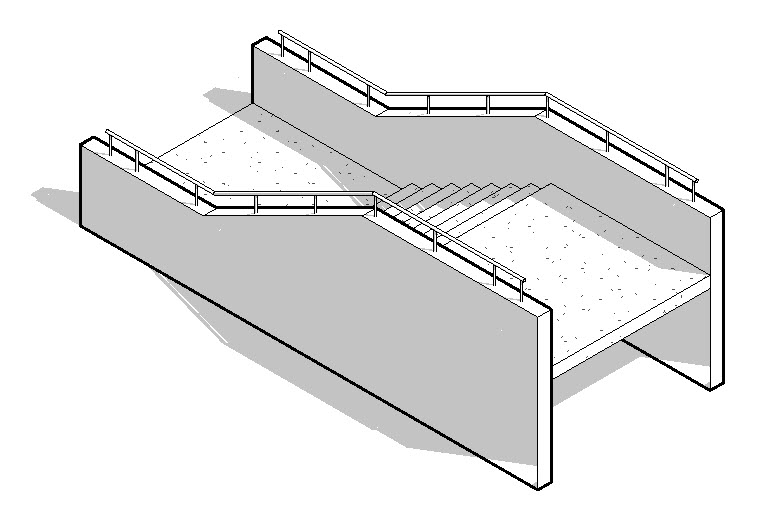
I wrote a post in July 2008 called Railing Over Wall, it was focused on this kind of condition.


This post revisits the same technique with 2014 and a different notion of a host element. The key to doing this is in the properties of the sketched line segments of the railing. This image depicts how three segments were created so they can be altered, each segment numbered 1-3.


These are the segment settings for #1, Slope: Flat and Height Correction: By Type.


These are the segment settings for #2, Slope: Sloped and Height Correction: By Type.


These are the segment settings for #3, Slope: Flat and Height Correction: Custom and 4'-0".


If we don't need a horizontal railing section at the top we can alter the sketch and use different settings for segment #2. If we do that these are the segment settings for #2, Slope: Sloped and Height Correction: Custom and 4'-0".


These are the two different sketch based railings side by side. The lower railing is missing its horizontal starting section. I just made the sketch of the first segment tiny so Revit would know what the starting elevation is. Without it I'd end up with a horizontal railing at 4'-0", aligned with the upper horizontal beam.


The line at the base of the railing is a tiny profile that is needed to host the bottom of the balusters. Without that bottom railing to terminate against they'd go to the lowest elevation of the railing (flat). I could offset the sacrificial railing so that it slips below the surface of the beam but in this case I wasn't worried about it. If you find it distracting this is what doing it looks like, though the balusters not finishing cleanly at the top of the beam may be more distracting.


Btw, the Beam Join tool was used to the get the beams to clean up.

Wednesday, August 29, 2012

Railing as Egress Paths

I've written about this before, egress stuff seems to be popular at times. A railing is a path and profile based element is easy to sketch something like the path to an exit. Straight and arc segments as well as even sloping conditions. Some of the other methods that I've written about here have the advantage that they can document the total length easily. A railing schedule will report the total length but we can't tag them with their total length.

Case-Apps to the rescue!

They've written a little application that is part of their larger suite of free, subscription and beta software for Revit. It's called "Send Railing Length to Selected Parameter".


Create a shared parameter called "Egress Path", add it to your project and assign it to the railing category. Sketch your railings disguised as egress paths. Now tag them. Oh right you can't show that value. Edit the tag family to create your own and use the same shared parameter. Reload the family and still nothing. Now use the Case app. It will let you select the parameter to use and plug the total length into each railing and that value will appear in your tags!

It's not automatic or fool proof. But it does make it a lot easier to consider a railing. If you like special graphics at the beginning and end of your egress paths then a railing is a bit fussier because you need some special "balusters" to get unique "symbols" at each end. Not impossible just a bit more work. Not necessarily more or less work than the other techniques, pick your poison!

While you are at it you should consider the rest of the pile of apps they have. You'll get their apps manager application which really makes it pretty easy to get and install them. I had both 2012 and 2013 installed in a few minutes after registering.

Thanks Case-inc guys! (wearing my T-Shirt as I write this, they gave me a shirt at RTC in Stone Mtn. in the interest of full disclosure)

Monday, January 23, 2012

Color Fill Legends Mixing with Stairs and Railings

David Light wrote a post about getting stairs to display better when color fill legends are involved. Then Brian Mackey wrote a post to offer another solution. David's approach involves using a solid fill and matching color to "blend" the color fill and the solid fill colors. Brian's involves using the new "Ghost Surfaces" feature.

To offer my two cents I wrote a comment to David's post after reading his. I mentioned what happens when we use the "Transparent" option for categories in Visibility/Graphics or using Override Graphics in View feature > By Element.

This is what you see on screen (using the "Transparent" option to "Override Graphics in View > By Element")(uh oh):


And this is what you get when you print (oh? okay):


Intrigued because I didn't bother to try the approach Brian suggested, I tried it. Using the "Ghost Surfaces" option to "Override Graphics in View > By Element" you see this on screen (looking good):


This is what you get when you print (oh, not so good):


Tag...you guys are "it"! :)

Friday, January 06, 2012

Hacking at Railings Again for 3D Grids

An exchange at RevitForum.org discussing 3D grids for 3D views or exporting to Navisworks prompted yet another "hackalicious" thought for Railings. I posted a VIDEO or this video so you can see and hear me discuss the concept. If you want to cut to the chase you can download the example project file (just scroll to the railing section on the page).

Aaron Maller shared some images (in the RFO thread) and concepts behind the line based families they've been using. Seeing them and reading the other posts made me think of railings yet again, because they don't mind curved paths and multiple segments. That and I'm not good with math that involves letters, weird signs or code.

    By the way, several Dallas area based RFO members (Dan, Jose, Bob, Tanner, Aaron and me) got together for dinner last night and I mentioned it to Aaron so naturally I ended up writing this post tonight. We went to Taverna by Lombardi. Dan found it because I mentioned I was in the mood for risotto (yum!). Thanks to Dan for getting it organized! Sorry, I digress...

The first thing I did was create a baluster family to show a grid name, using 3D Text. Then I created a profile for the "railing", just a thin rectangle "kick plate" to "trip" over in the model. Once they were loaded into the project I created a new type for each Grid name, you'd need a type for every grid name in the project.


With the the types established I'm ready for railing types. I just created a new railing type for each grid as well. Then it's click click click... adding the matching baluster type to the railing type. Yep, this is the tedious part. It's more fun once you get to sketch the grids...define "fun" though?


Like I said railings don't mind curves so here's a curved grid added in.


Last image is using "nicer" grid stands to identify them, more like the example Aaron showed at RFO.


Listen and Watch my video here?


In actual use, I'd start in a empty project file and link in the project file that has the governing grids in them. Then use Copy/Monitor to create equivalent Revit grids and put the 3D grids (hacked railings) on top, at each level of the bldg. Copy/Monitor let's me open my 3D grid file any time and see if there are any changes I need to be aware of. I just have to provide a new export to .nwc (or .dwg) any time there is a change, and pass along the new file.

Thursday, December 22, 2011

You've Got a Bad Profile

Considering the time of year and checking lists you don't want a bad profile. If you create a profile family for a railing and don't do a very good job of it Revit won't offer you your profile in the list of available profiles.


The missing profile you expect to find here is a clue that your profile is bad. You need to check your sketch to  make sure you don't have a Bad Sketch. Only kids with a good profile get to use their profile in their railings.

Tuesday, December 20, 2011

Bending Railings to Your Will

Food for thought, what if we used railings for millwork and egress paths? By millwork I mean custom work, not fixed sized cabinets which are often referred to as casework by some architecture and interior firms). As for egress paths, I've written about them many times (I've put a list of those posts at the end of this one) in the past and the example of using a line based family kept me busy for quite some time with requests from people to get their own copy. Busy enough that I finally made it possible to download directly without needing to ask. I also recently mentioned the technique that Brian Mackey uses to demonstrate stair clearance using a railing, so that's yet another way to bend railings to your will.

A railing can do the same task as the egress path I've written about. That example only came about as a possible example of how to use the new line based family template (new in 2006), not something optimized for the task but it's worked pretty well over the years. If you consider applying a "person" profile to a railing, like for Brian's stair clearance, you've just got to sketch the path the railing takes. You can schedule the railing and provide a similar tagging approach to identify each path as different as well as display the total length. Give it a go?

Back to the idea of millwork. Railings are based on profiles, so are cabinets, at least when you are being really schematic. Obviously it won't really do the job for fabrication or construction documentation. If you want a fast way to "draw" millwork a railing works pretty well. A railing sketch is really tolerant of the path being straight or curved too. To get started you sketch the base cabinet profile, save it. Sketch the upper cabinet, save it. You can incorporate the counter profile in the base or make it separate. Load the profiles into a railing type and adjust some values and you can get something like this.


It works pretty well as long as you don't care about seeing drawers and doors. What you see in the image above is railings posing as millwork cabinets and face-based families (line work only) assigned to the Casework category.


It is necessary to keep the upper and lower cabinets separate otherwise you can't get them (upper cabinets) to show up above. In the plan view you see here I've temporarily turned on the underlay so I can apply the Linework tool to see the upper cabinet. Relatively small price to pay for the views that really need to see it.

The neat thing about this approach is that you can get schematic design info such as overall length of different millwork conditions via a schedule. Then when you are ready to dive deeper you can replace them or, as in the image, overlay face-based families to "finish" the detailing. One schedule (early) for schematic and  another (later) for a more detailed summary of cabinets pieces and parts. It isn't hard to make a railing look a lot like something else in a schedule. Just change the schedule title, rename the railing type, change the assembly code values and you've got a pretty convincing railing slash millwork. Maybe call it milling or railwork?

It won't satisfy everyone or maybe anyone...well it did make a few folks more content than they were a few years ago when we decided to do it.

Past Egress Posts (a summary)
Egress Path
Egress Path Update
Egress Path Tags - New Versions
Egress Path of Travel Uh Oh
Egress Example Update
Egress Regress
Egress Family Arc Version

Thursday, April 28, 2011

Railings and Stairs - Usability Study

The Autodesk User Experience team is looking for Architects, Drafters, Designers and CAD Managers who use Revit Architecture or other products to design stairs or railings, to participate in a usability study of some Autodesk software concepts.


The sessions are approximately 90 minutes long. If you are interested in participating, please take a few minutes to fill in this short questionnaire. Participants who are a good match for our study will be contacted within a few days.


Your involvement helps make Autodesk products better.

Thursday, June 03, 2010

Stairs in the Wild

Revit stairs and railings are long overdue for some serious development time and effort. It's underway if you can read the stars. I was recently in Sydney to attend the Revit Technology Conference 2010. Phil Read attended as well and we both shared the same plane back to Los Angeles. On our way to the Air New Zealand lounge (as Phil's guest) we stopped to admire this stair. The glazing railing is not attainable with the current railing feature set. It's off to in-place modeling. I'll leave it to Phil to get around to discussing how he'd tackle this one on his own blog in his own time if he chooses.


This next one is at the current hotel in Kuwait City. The Crowne Plaza has been restored to its former glory after the damage it suffered during the Iraq invasion. This stair was present then but it is in much better shape. Again the railing features a bottom edge detail that the current features don't support (okay...without fussing a bit).


By the way, planning is under way to bring the Revit Technology Conference to the USA for late spring to early summer of 2011. If you're interested in attending it will be held in Southern California. Check out the Revit Technology Conference 2011 website for further details as they develop.

Tuesday, April 13, 2010

Dept. of Echo - Railings

Erik posted two items at Inside the Factory the other day that deserve repeating just on the off chance that anyone who reads this blog isn't already reading it regularly. If it isn't on your reading list it probably ought to be. The first post discusses the various pieces and parts of a railing assembly.


He'd like some insight into what we call the various parts in the image. What one person calls a bracket is another person's wall anchor bracket...and so it goes. Add in manufacturers/fabricators and pinning down a simple/single name can be a real chore!

The second post provides some high level comments/concerns/ideas that have been shared with them over the months/years. If you have some opinions about railings and what they could/should be in Revit please take some time to share them with him. You might enjoy seeing some of your wisdom take flight in a future release.

Wednesday, November 11, 2009

Railing Over Wall Video

I posted this technique back in July 2008. I decided to make a quick video to accompany the information in the original post. I've embedded it here and in the old post.


Thursday, September 04, 2008

Stairs and Railings - Quick Reminder

A railing follows its host stair until you edit the sketch of the Railing. At this point Revit "sighs in relief" and says to itself, "once less thing to manage!", and hands the Railing Sketch responsibility off to you/me/someone. Revit is finished with that Railing. Any changes to the stair and your railing stays put. Revit is loathe to mess up your lovely Railing modifications.

Saturday, August 16, 2008

Railing Encore


I dug up another railing example that I've had kicking around for a few years now. It was inspired by a client who was modeling an addition to an existing school building that had this pattern on its stairs already. There was some pressure to use this in the new work as well.


If you look really close you'll see the railing is "floating" on a cushion of air. The exercise was about making the baluster, not worrying about posts. It was quite a lesson in Automatic Sketch Dimensions.


These are the "secret" dimensions that Revit uses to manage the position of your family's parts when you don't take the trouble to be specific. You don't know they are there? That's because they are off by default in all family templates. You can find them under the Annotation Categories Tab in Visibility/Graphics. I wrote this POST about them in April of 2006. But I digress.

I've posted the file so it can be downloaded if interested.
You can watch a video about ASD's about this too.

Download Example Project File HERE.

Tuesday, July 22, 2008

Railings and Baluster Patterns

Railings leave much to be desired in terms of truly flexible design. When you need to create a railing that requires different baluster panel sizes, in particular at its ends, things start getting fussy.

This is an example of a railing that has been "designed" to use two different panel sizes. The overall length of the railing must be factored in at the outset. Railings are just like wallpaper which has a defined "repeating" pattern that must be plotted/planned out before beginning work.

Assuming that the pattern requires a repeating 24" typical panel interupted now and then with an 18" panel for a design esthetic as well as finishing up with 18" panels at each end because the overall length "required" is 20'-0". These are nice clean numbers obviously and if the real world defined some messy dimensions, the first and last panel's size(s)would need to be adjusted to match those messy numbers.

This is the final result, a 20'-0" railing with 24" and 18" panels.


This is the Baluster dialog captured in two stages because it wasn't possible to capture a scrolling window for some reason with SnagIT.


This is the rest of the dialog.


This is the sketch length, one long segment @ 20'-0" long.


The key parts of this pattern:
The first panel uses a 9" offset which is half the panel width
The distance from center to center between 18" and 24" panels is 1'-9"

When laying this sort of thing out you need to start with the overall required length. Define how many "normal" panels fit and what is left over. Then decide whether you are splitting this left over amount between start and end or placing it entirely at one end. Once you've figured this out you can start defining the railing baluster pattern.

I've posted the example project file that these images are based on HERE.

An awesome improvement to railings would be to permit a baluster to flex like a curtain panel in a curtain wall. Ironic a bit because if I recall correctly the very early railing tool was the curtain wall tool or vice versa?

Thursday, July 17, 2008

Railing over a Wall

This subject comes up every now and then. An often overlooked feature of railings (yes they do need many more features)and stairs may help a bit. This example shows two railings following the profile of two walls. Railings want to be hosted by either a floor, stair or ramp and they "turn up their nose" at the idea of a top of a wall as a host.

The railings are following the wall profile and they are not hosted by the stair, they are not hosted by anything. Here's an image of the railing using wireframe.

The key to this is in the properties of the sketched line segments of the railing. This image depicts how each has been altered.


Access to these properties can be found on the Options Bar when a segment is selected. You cannot alter multiple selections at one time, select only one.

The bottom segment's settings.


The middle segment's settings.


The top segment's settings.


The middle segment is permitted to slope using its Slope setting and the top segment defines how much to slope. It is necessary to be careful where each segment starts and ends to define the desired slope. The other subtle part of this is that there is a bottom "railing" acting as the base constraint for the balusters so they don't project all the way down to the level.

I've posted an example Project File HERE.

Here's a video I made on November 11, 2009 and added to this post too.


Wednesday, January 31, 2007

Fence Linestyle?

Revit doesn't allow us to create a line style that includes text as a symbol. Common uses for this are pipelines, fences, overhead electrical lines and many more. Revit’s repeating detail makes this somewhat doable if you create a detail component that has the symbol you need, not text though, you must draw the letter with lines. The line based detail component is another possibility. The thinking goes that we should use tags to identify things like pipe. Instead of drawing a line with HW embedded as a pattern we just apply a tag for the pipe system's abbreviation of HW. That doesn't really help for a fence though...

...and about a fence and mimicking a fence line style...an idea popped in my head, “What about a railing and baluster to do this?” We probably want a 3D fence anyway but what if we want the --X-----X-- in plan? At first I thought, “naah, can’t do it because you can’t create a baluster that gives you subcategories to manage visibility of parts”.

So I dismissed it until now. Then I thought, if you nest a detail component for the ---X--- and nested a generic model family for the baluster or fence portions you can assign each to visibility parameters that will give you control over each via visibility graphics under Generic Models and Detail Components. Ultimately we need the ---X--- with no rail visible in plan and the rails/baluster/panel in 3D with no ---X---.

It all comes down to what you really want but this is what I mocked up, messing around. Maybe the concept will spur some other ideas?


Hopefully they’ll just give us more options with line styles and it’ll be easy!

Download the sample File