In my earlier review of the text editor I included this warning:
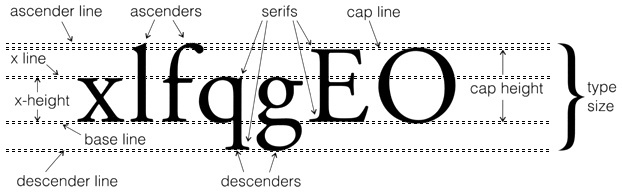
My post mentions that text height is defined differently, more like AutoCAD. The help documentation offers a graphic and an explanation of what has changed. I also marked up this image from Dynamic Statements to indicate how the text height is defined now. The overall height is based upon the capital letter M, measured from Base Line to Cap Height (for M). That's apparently more like how AutoCAD does it.

Brian Mackey (The Revit Geek's Blog) has written two posts about what he's observed happen with an upgrade so far. This is the FIRST and this is the SECOND post. Damien Ferlazzo (Revit Link blog) shares his experience upgrading text so far with his POST. Check out their posts.
I've also read a couple of threads in forums from users sharing what has happened with their TEST RUNS at upgrading. I emphasize that TEST RUNS because at this point that is exactly what we should be doing.
When you upgrade from older projects you're going to have to deal with text changing to reconcile these changes. That means you CAN'T upgrade a project a couple days before a major deadline and expect to just hit print.I should have also said that means anything that has text in it, like tags, title blocks and so on...
My post mentions that text height is defined differently, more like AutoCAD. The help documentation offers a graphic and an explanation of what has changed. I also marked up this image from Dynamic Statements to indicate how the text height is defined now. The overall height is based upon the capital letter M, measured from Base Line to Cap Height (for M). That's apparently more like how AutoCAD does it.
Brian Mackey (The Revit Geek's Blog) has written two posts about what he's observed happen with an upgrade so far. This is the FIRST and this is the SECOND post. Damien Ferlazzo (Revit Link blog) shares his experience upgrading text so far with his POST. Check out their posts.
I've also read a couple of threads in forums from users sharing what has happened with their TEST RUNS at upgrading. I emphasize that TEST RUNS because at this point that is exactly what we should be doing.
Please, please, pretty please with sugar on top...don't upgrade and expect to just carry on without reviewing everything very carefully. You (we all) have some text fixing to do!P.S. As I was finishing this post I just heard from someone that they are having some issues trying to use the ALT codes for special characters via Character Map. I also heard that some text types were not editable at first but closing the view and opening it again helped for some reason. I'm sure there will be more to come as more people start using it seriously.


