I hear and read quite often these days that people will use Acquire Coordinates on an imported file and then remove the link. They import the source file again but use Positioning: Auto by Shared Coordinates. The reason offered is usually that they are doing it because they want to prove to themselves that the file IS sharing coordinates.
It is NOT a necessary step. Don't bother to do it. It won't harm your project if you do, it's just pointless.
Showing posts with label Recommendations. Show all posts
Showing posts with label Recommendations. Show all posts
Wednesday, February 04, 2015


Saturday, January 04, 2014
Autodesk Robot Structural Analysis Book is Available

Ken Marsh published his first book dedicated to Autodesk' Robot Structural Analysis Professional 2013 (it's also the first book for it). He intends it to be your essential introduction to its features, functions, and workflow. He's confident that you will be able to master the tools you'll need to make Robot work for you.
Some of its highlights include:
- Demystify the interface
- Manipulate and manage Robot tables like a pro
- Learn how to use Robot's modeling tools
- Master loading techniques
- Harness Robot automated load combinations
- Decipher simplified seismic loading
- Discover workflows for steel and concrete design
- Gain insights to help troubleshoot issues
Ken is a structural engineer and was, until recently, the Revit Structure Quality Assurance Analyst at Autodesk. He works hard to be a champion of Building Information Modeling (BIM) technology for the Architecture, Engineering, and Construction industry. In addition to writing this book he is currently working to promote fully integrated structural analysis, design, and documentation by developing custom Revit API add-ons, providing software training, and consulting services for firms as they transition to a more fully BIM-centric process.
I appreciate and admire his willingness to write about a topic, that must be a niche among niches, catering to structural engineers. I was also curious about whether a 2014 edition is going to be available, he replied that he's working on the 2014 edition now.
All the best with the book Ken!
Sunday, December 22, 2013
Last Minute Christmas Gift Suggestion - BIM. After. Dark.
Yesterday I mentioned a great last minute Christmas gift, a book called Renaissance Revit by Paul Aubin. I thought I'd mention another last minute suggestion that like Paul's book will help you stretch, get more out Revit.
Jeffrey Pinheiro (aka The Revit Kid and his blog by the same name) has begun a project he's called Bim. After. Dark. His tagline is "Learn how to make your BIM sexy..."

I got a sneak preview of the videos just before he released them on December 10th. I think he's delivered on his promise. If you're just starting out with Revit then you should consider adding this to your learning library too. If you've been frustrated thinking that your Revit project(s) just lack a little presentation Edge then his video may be just what you need to see to open your eyes to what is possible, that your Revit project presentations CAN be sexy...

I particularly liked how he tweaked the stock content and tools to get what he wanted for his presentations. He's clearly got a talent and opinion about documentation style that's worth sharing and worth you taking the time to listen. I also enjoyed his conversational approach to demonstrating his techniques.
Too often a video is too obviously scripted or worse comes off as if the presenter thinks his/her audience is a school child. With Jeffrey you feel like he's just sitting next to you and asking if he can "borrow the mouse" for a moment. In fact I think a few times he gets a bit too excited and rushes his delivery as though he can't wait to tell you this, and this...and oh, this too!
One other reviewer's comment that I agree with is that he left in subtle changes as he presented topics, or "mistakes" if you will. They helped contribute to the conversational feeling and also mimicked the same sort of thing you'd experience while trying to work through an idea. It's all good!
He's offering a simple structure: Buy just videos for $39, buy videos and samples for $79, or buy The Complete Package (you also get videos for Revit to Max to V-Ray and Prezi for Architects) for $129. Several price points for your cost conscious last minute gift shopping. Like I said for Paul's book, you may find it necessary to buy yourself a gift in the process.
Check out his promo video and see what you think. May your Christmas also be "sexy"...
Jeffrey Pinheiro (aka The Revit Kid and his blog by the same name) has begun a project he's called Bim. After. Dark. His tagline is "Learn how to make your BIM sexy..."
I got a sneak preview of the videos just before he released them on December 10th. I think he's delivered on his promise. If you're just starting out with Revit then you should consider adding this to your learning library too. If you've been frustrated thinking that your Revit project(s) just lack a little presentation Edge then his video may be just what you need to see to open your eyes to what is possible, that your Revit project presentations CAN be sexy...

I particularly liked how he tweaked the stock content and tools to get what he wanted for his presentations. He's clearly got a talent and opinion about documentation style that's worth sharing and worth you taking the time to listen. I also enjoyed his conversational approach to demonstrating his techniques.
Too often a video is too obviously scripted or worse comes off as if the presenter thinks his/her audience is a school child. With Jeffrey you feel like he's just sitting next to you and asking if he can "borrow the mouse" for a moment. In fact I think a few times he gets a bit too excited and rushes his delivery as though he can't wait to tell you this, and this...and oh, this too!
One other reviewer's comment that I agree with is that he left in subtle changes as he presented topics, or "mistakes" if you will. They helped contribute to the conversational feeling and also mimicked the same sort of thing you'd experience while trying to work through an idea. It's all good!
He's offering a simple structure: Buy just videos for $39, buy videos and samples for $79, or buy The Complete Package (you also get videos for Revit to Max to V-Ray and Prezi for Architects) for $129. Several price points for your cost conscious last minute gift shopping. Like I said for Paul's book, you may find it necessary to buy yourself a gift in the process.
Check out his promo video and see what you think. May your Christmas also be "sexy"...
Saturday, March 30, 2013
What is Revit and BIM Resource
Alex Gore and his firm F9 Productions have created, as part of their company website, a resource for people that are just getting started with Revit and BIM or those who are still trying to decide what to do.
The site offers these items of interest:
A skeptic might read this and regard it as purely a marketing move. Alex's primary motive is to share the wealth with the community so to speak. For example a frequent question or concern people have is being able to see a completed set of documents. This is based on their fear, uncertainty or doubt that another software application, that is so intrinsically tied to how they make money, will truly be able to do what they need to do. So at the very least being able to examine their sample project and set may be useful, and if it is then the rest is "gravy". Have a look, see if you find something useful.
The site offers these items of interest:
- A brief description of important modeling concepts
- A PDF example of a complete Construction Documentation set
- The Revit file of the above mentioned PDF
- A 2012 Revit Residential Template to start your own creations
- Links to tutorials for further help
A skeptic might read this and regard it as purely a marketing move. Alex's primary motive is to share the wealth with the community so to speak. For example a frequent question or concern people have is being able to see a completed set of documents. This is based on their fear, uncertainty or doubt that another software application, that is so intrinsically tied to how they make money, will truly be able to do what they need to do. So at the very least being able to examine their sample project and set may be useful, and if it is then the rest is "gravy". Have a look, see if you find something useful.
Friday, December 30, 2011
Shades of Grey Revit Blog Plug
This is a brief post to plug Andy Milburn's blog Shades of Grey. He started blogging in October of 2010 and his work is a fine testimony to quality over quantity.

Lately his posts have been about his exploration into the work of various masters and how he's used Revit to further his study of them. I enjoy his work and appreciate that he takes the time to share it with us. If you haven't already found his blog I think you owe it to yourself to subscribe so you won't miss future posts.
Lately his posts have been about his exploration into the work of various masters and how he's used Revit to further his study of them. I enjoy his work and appreciate that he takes the time to share it with us. If you haven't already found his blog I think you owe it to yourself to subscribe so you won't miss future posts.
Friday, September 02, 2011
Mastering Autodesk Navisworks 2012
As I just wrote about Navisworks concepts yesterday. I should mention a great new source of information on the product. Wiley/Sybex just published the hard work of two Autodesk Navisworks guys, Jason Dodds and Scott Johnson. Naturally there is a host of people involved in getting a book finished but the guy they relied on to check their claims and recommendations is Michael Smith, their technical editor.

Jason has been supporting Navisworks for many years as well as in his current role as Autodesk Construction Solutions Engineer. Scott also toils at Autodesk, he's a Senior Technical Account Manager. These guys both get called in to make things work. Michael works for C.W. Driver as their BIM Manager in Pasadena, CA. These three together provide the necessary depth to get a book like this finished.
Navisworks can be learned pretty quickly, but it takes some time behind the wheel to really master it. As with anything you tend to learn enough to get by and probably don't really dig deeper. This book provides practical examples throughout in "Real World Scenarios" (a part of the Wiley/Sybex Mastering series format).
There is no shortage of settings in Navisworks and fortunately the guys took enough time to dig into even some of the more arcane stuff, with an eye toward what you are likely to need most of the time. For example in Chapter 4 there is a bit more than page dedicated to the subtlety of exporting from Revit with one option checked or not (Convert element Properties). Unchecked there are six properties exported and checked there are 18...that's just for a roof element.
You can read the Table of Contents and there are three sample chapter excerpts in PDF format; Chapter 2, Chapter 3 and Chapter 4. It's also available as a EPUB E-Book and Adobe E-Book. Here's the table of contents so you can review it directly. There's 456 pages from inside the cover to the back, including the index etc.
Table of Contents
Book Description
Author Information
Supporting Files
If you are a Navisworks person you'll probably want this in your collection, check it out!!
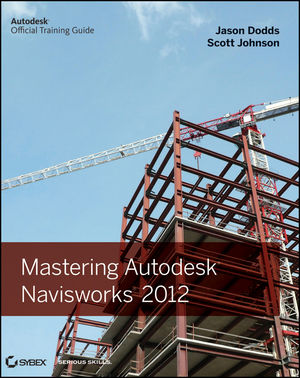
Jason has been supporting Navisworks for many years as well as in his current role as Autodesk Construction Solutions Engineer. Scott also toils at Autodesk, he's a Senior Technical Account Manager. These guys both get called in to make things work. Michael works for C.W. Driver as their BIM Manager in Pasadena, CA. These three together provide the necessary depth to get a book like this finished.
Navisworks can be learned pretty quickly, but it takes some time behind the wheel to really master it. As with anything you tend to learn enough to get by and probably don't really dig deeper. This book provides practical examples throughout in "Real World Scenarios" (a part of the Wiley/Sybex Mastering series format).
There is no shortage of settings in Navisworks and fortunately the guys took enough time to dig into even some of the more arcane stuff, with an eye toward what you are likely to need most of the time. For example in Chapter 4 there is a bit more than page dedicated to the subtlety of exporting from Revit with one option checked or not (Convert element Properties). Unchecked there are six properties exported and checked there are 18...that's just for a roof element.
You can read the Table of Contents and there are three sample chapter excerpts in PDF format; Chapter 2, Chapter 3 and Chapter 4. It's also available as a EPUB E-Book and Adobe E-Book. Here's the table of contents so you can review it directly. There's 456 pages from inside the cover to the back, including the index etc.
Table of Contents
- Chapter 1: Getting to know Navisworks.
Chapter 2: Bringing it all together: Files and File Types.
Chapter 3: Moving around the Model.
Chapter 4: Climbing the Selection Tree.
Chapter 5: Model Snap Shots: Sections, Viewpoints and Animations.
Chapter 6: Documenting Projects.
Chapter 7: 4D Sequencing with TimeLiner.
Chapter 8: Clash Detection.
Chapter 9: Creating Visualizations with Navisworks.
Chapter 10: Animating Objects.
Chapter 11: Give Objects Life and Action with Scripter.
Chapter 12: Collaborating Outside of Navisworks.
Chapter 13: Other Useful Navisworks Tools.
Book Description
Author Information
Supporting Files
If you are a Navisworks person you'll probably want this in your collection, check it out!!
Thursday, March 17, 2011
Your Project Team Should Use the Same Build!
A post at AUGI prompted me to reply and I decide to make it a post here too after discovering I haven't written about this here yet.
The essence of the question is, "Does it matter if we are using different builds in our firm?"
Short answer is...
A project team should be using the same build to work on shared project files. For example, an architecture team working on a "shell" project file and "interior/core/circulation" model (2 models) should all be using the same build. Anyone who is going to contribute to the project should be using the same build as the rest of the team.
Stretching the short answer...
Technically, you could have different builds deployed but avoid letting it happen within the same team. If a new person gets added to the team...pause and think about the build.
Personally I think it would be nice if the software would mention that situation when a file is opened. In an earlier post here on my blog I mentioned that David Baldacchino and David Kingham have written such a feature into their AutoHotKey Local File scripts. They've also shared their work here in another thread at AUGI (DK's Script & DB's Script).
Think of it this way, they don't issue new builds because they feel like it or just because a couple months went by and they are restless. They issue them because they've fixed stuff, stuff that has been aggravating users enough to report them and press for fixes. They also fix stuff that they couldn't deal with prior to other releases or builds getting issued.
When I use an old build while the rest of the team is using the new build my version can introduce a problem that the newer build fixes. When I get out of the project the rest of the team interacting with the project "fixes" what my build "broke". When I come back in and start using my build I can reintroduce the problem, starting the cycle over again. Much like passing a cold around the office "forever".
At its most harmless...nothing happens and we never notice. At its worst we have local/central file corruption and problems. How severe depends on how big the fixes are in the newer build.
I should also add that Revit doesn't have any problem opening files that use different builds as long as they are the same version, such as RAC 2011. The file format changes with a new "version". Builds are incremental changes to the code within a version.
How do you know what build you are using? Click the smallish arrow next the HELP button, then click About. Revit displays the build number in the upper right corner of the screen that appears.

The essence of the question is, "Does it matter if we are using different builds in our firm?"
Short answer is...
A project team should be using the same build to work on shared project files. For example, an architecture team working on a "shell" project file and "interior/core/circulation" model (2 models) should all be using the same build. Anyone who is going to contribute to the project should be using the same build as the rest of the team.
Stretching the short answer...
Technically, you could have different builds deployed but avoid letting it happen within the same team. If a new person gets added to the team...pause and think about the build.
Personally I think it would be nice if the software would mention that situation when a file is opened. In an earlier post here on my blog I mentioned that David Baldacchino and David Kingham have written such a feature into their AutoHotKey Local File scripts. They've also shared their work here in another thread at AUGI (DK's Script & DB's Script).
Think of it this way, they don't issue new builds because they feel like it or just because a couple months went by and they are restless. They issue them because they've fixed stuff, stuff that has been aggravating users enough to report them and press for fixes. They also fix stuff that they couldn't deal with prior to other releases or builds getting issued.
When I use an old build while the rest of the team is using the new build my version can introduce a problem that the newer build fixes. When I get out of the project the rest of the team interacting with the project "fixes" what my build "broke". When I come back in and start using my build I can reintroduce the problem, starting the cycle over again. Much like passing a cold around the office "forever".
At its most harmless...nothing happens and we never notice. At its worst we have local/central file corruption and problems. How severe depends on how big the fixes are in the newer build.
I should also add that Revit doesn't have any problem opening files that use different builds as long as they are the same version, such as RAC 2011. The file format changes with a new "version". Builds are incremental changes to the code within a version.
How do you know what build you are using? Click the smallish arrow next the HELP button, then click About. Revit displays the build number in the upper right corner of the screen that appears.

Subscribe to:
Posts (Atom)