This is an update to a much earlier post after getting a couple comments on that thread. These are three companies I'm familiar with that are providing solutions that contend with sharing details between projects and multiple model projects.
Revolution Design - Revit Workflow
26 Degrees Software - ViewAQC
Parallax Team - Parallax Linked Details
Check them out!
Showing posts with label Management. Show all posts
Showing posts with label Management. Show all posts
Monday, May 06, 2019


Monday, March 07, 2016
Line Styles Embedded in Families
Reading a thread at AUGI tonight prompted this post. Line Styles aren't a thing in Revit families, the option is disabled if you attempt to review them while in the Family Editor UI.

The family discussed in the thread seems innocent enough until it is loaded into a project file. These are the line styles that are in the default template (imperial).

This is the same dialog after loading the family; nearly 100 more (98) line styles show up.

The culprit is Transfer Project Standards (TPS). It is easy to transfer line styles from a project to a family. We need Object Styles in families not Line Styles. Make sure you don't select Linestyles when/IF you use TPS.

If you've already got many rogue Line Styles you can delete them from the project and in Revit 2016 you can select more than one at a time and click Delete. Just remember if Delete is disabled then you've got a built-in (system) line style selected.
What about cleaning out the family itself? They don't give us a tool to do that. Purge Unused doesn't see them unfortunately. Robert Bell, in the AUGI Thread, offers a solution though. Load the bad family into a empty template (choose the None option for example). Delete all of the line styles you don't want. Then Save the family and overwrite the original. If the family is already loaded into your project just do the same thing, delete the line styles (it's just a little harder to tell) and Save the family to overwrite the original.
While you're at it, don't use TPS on Line Patterns, like shown in the image above. You'll probably get many more than you really want too. Those can be deleted a bit more easily though.
I checked the Autodesk Exchange Apps site to see if any offer a way to purge line styles from families. I found one that does it for projects but none that claim to do it for families; at least not based on searching for that criteria. It might be something Dynamo can be used to resolve; I'll have to check into that.
---------------------
Update 08/22/2016: Dale Bartlett has shared an app to purge these embedded line styles.
Update 05/09/2017: The file is no longer where Dale shared it, I don't know where it is now so I've removed the link.
Update 05/15/2017: Dale provided a new link to a 2017 compatible version VIA THIS URL.

The family discussed in the thread seems innocent enough until it is loaded into a project file. These are the line styles that are in the default template (imperial).

This is the same dialog after loading the family; nearly 100 more (98) line styles show up.

The culprit is Transfer Project Standards (TPS). It is easy to transfer line styles from a project to a family. We need Object Styles in families not Line Styles. Make sure you don't select Linestyles when/IF you use TPS.

If you've already got many rogue Line Styles you can delete them from the project and in Revit 2016 you can select more than one at a time and click Delete. Just remember if Delete is disabled then you've got a built-in (system) line style selected.
What about cleaning out the family itself? They don't give us a tool to do that. Purge Unused doesn't see them unfortunately. Robert Bell, in the AUGI Thread, offers a solution though. Load the bad family into a empty template (choose the None option for example). Delete all of the line styles you don't want. Then Save the family and overwrite the original. If the family is already loaded into your project just do the same thing, delete the line styles (it's just a little harder to tell) and Save the family to overwrite the original.
While you're at it, don't use TPS on Line Patterns, like shown in the image above. You'll probably get many more than you really want too. Those can be deleted a bit more easily though.
I checked the Autodesk Exchange Apps site to see if any offer a way to purge line styles from families. I found one that does it for projects but none that claim to do it for families; at least not based on searching for that criteria. It might be something Dynamo can be used to resolve; I'll have to check into that.
---------------------
Update 08/22/2016: Dale Bartlett has shared an app to purge these embedded line styles.
Update 05/09/2017: The file is no longer where Dale shared it, I don't know where it is now so I've removed the link.
Update 05/15/2017: Dale provided a new link to a 2017 compatible version VIA THIS URL.
Thursday, January 14, 2016
Worksharing - Loading Content
I read Jason's post this morning and he describes a classic worksharing gotcha. Unfortunately he hasn't identified the true culprit. I'm referring to this part of his post specifically.

This error and situation is easy to replicate.
For example, if eight people all introduce the same new family to the project then by the time the last person uses SwC there will be eight versions of this family listed in the Project Browser. This is what the Project Browser looks like after just two users think they both need to load a new double door and type.

Jason's post is focused on cleaning up after oneself and it IS important but it is also important to manage the loading of content and harvested details. It is equally important that people understand why these extra versions show up in the first place. Each time someone uses Load Family or Insert from File they must reconcile the warnings that appear before anyone has a chance to begin using the wrong version of the families that are duplicated.
I think it is worth restating that the subtlety of this issue is that this only happens when more than one user is introducing the same new family to the project (via their Local Files).
Once the family is part of the project (defined in the Central File) Revit doesn't get confused anymore. Here's what happens when I introduce the Break Line family he mentioned to the project via two users. Keep in mind that there is no Break Line family defined in the Central File at the moment. Each user loads the family, into their Local File, unaware the other user is doing it too. The first person to use SwC is fine but the second user sees this message (I expanded the warning to see the family description).

When the first user uses Reload Latest or SwC they'll both be able to see this in the Project Browser, listed beneath Detail Items.

Subtlety compounded with yet another subtlety...if the family is already defined in the project (Central File) but a new TYPE is loaded by more than one user then we end up with this situation in the Project Browser.

To close and return to what inspired my post, Jason went on to write that they've abandoned using Detail Components in their details because of this issue. Tragic. They (the detail families) aren't the problem; Revit's worksharing behavior and user habits are. I hope he'll revisit that decision.
One of our most notorious examples is the infamous Break Line. Each drafting view we imported had a copy of the break line family. By the time anyone noticed, the project model had “Break Line (1)” through “Break Line (22)”.What he describes is the result of worksharing and multiple users loading the same family in their own local files. Revit sees multiple versions of the same file being loaded from different local files (users) and seeks to protect them by renaming the other versions it encounters. We see this sort of message when it happens.

This error and situation is easy to replicate.
- Two users open local files for the same project
- Each user loads a new family and the same type
- Each uses Synchronize with Central (SwC)
For example, if eight people all introduce the same new family to the project then by the time the last person uses SwC there will be eight versions of this family listed in the Project Browser. This is what the Project Browser looks like after just two users think they both need to load a new double door and type.

Jason's post is focused on cleaning up after oneself and it IS important but it is also important to manage the loading of content and harvested details. It is equally important that people understand why these extra versions show up in the first place. Each time someone uses Load Family or Insert from File they must reconcile the warnings that appear before anyone has a chance to begin using the wrong version of the families that are duplicated.
I think it is worth restating that the subtlety of this issue is that this only happens when more than one user is introducing the same new family to the project (via their Local Files).
Once the family is part of the project (defined in the Central File) Revit doesn't get confused anymore. Here's what happens when I introduce the Break Line family he mentioned to the project via two users. Keep in mind that there is no Break Line family defined in the Central File at the moment. Each user loads the family, into their Local File, unaware the other user is doing it too. The first person to use SwC is fine but the second user sees this message (I expanded the warning to see the family description).
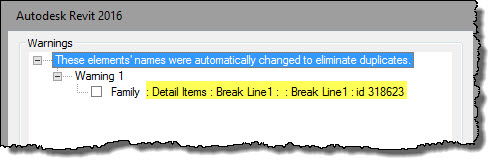
When the first user uses Reload Latest or SwC they'll both be able to see this in the Project Browser, listed beneath Detail Items.

Subtlety compounded with yet another subtlety...if the family is already defined in the project (Central File) but a new TYPE is loaded by more than one user then we end up with this situation in the Project Browser.

How do we avoid this situation?
As soon as we think we need to load a new family or type...STOP.
Who (on our team) is responsible for ensuring the content we need is available to us? There ISN'T any ONE person assigned to this? There should be. All new content should be requested, requests sent to or asked of this person. That person can delegate the task.
The goal is to avoid the situation where more than one user is loading the same new content.
Only ONE person needs to load the family(ies)/type(s) and then use SwC to make it available to everyone else on the team (they use Reload Latest). We are working on the same project after all.
To close and return to what inspired my post, Jason went on to write that they've abandoned using Detail Components in their details because of this issue. Tragic. They (the detail families) aren't the problem; Revit's worksharing behavior and user habits are. I hope he'll revisit that decision.
Thursday, April 09, 2015
Justifying a Revit Manager
Imagine...you work for a firm that doesn't have a dedicated Revit Manager. There are nearly fifty of you toiling away with Revit now, things are busy, business is growing. That's great!
Still, management isn't interested in having a dedicated Revit Manager. The current solution is to divide up the things that person would do across three power users in the office. A year or so ago when there was about thirty people it didn't seem like a problem, as much.
I'd want to find out how my firm's management makes decisions about staff in general. When do they decide they need another office secretary, assistant, architect, intern or anyone? What factors, what numbers are they crunching, considering when they do that? How much analytic effort is put into it? Who are they entrusting with the decision to do something ultimately?
Let's say in this situation, we have a full time IT person. How did they decide that was necessary? I'd want to know why they consider that different from a Revit Manager (or Design Technology Manager). This is software that so many people rely on for 40+ hours a week to do billable work. I think that makes it (the software) important, which in turn makes the role as important to the firm as the IT person is to keep computers functioning well and securely. If they really don't recognize that, then I'd want to understand their logic, if possible. Then I could counter their thinking with more data, more examples.
It is also important that they (management) appreciate they ARE already paying for this person. They are currently paying other people to do that person's work (the three people mentioned earlier). Hopefully they aren't so distracted to think that's not the situation at hand. Each minute they are not directly billable is that person's time.
As such they need to quantify how much time and money that effort, spread across three people, really costs. It's quite easy to ignore money trickling out the door when they don't have a security camera focused on it to help them see it. How is it affecting them being billable, providing a greater income and return for their effort than the internal work that is distracting them.
Chances are good that, lacking a specific support person, there are even more indirect costs that are not getting tracked well (or at all) because those three are not really covering everything that arises. Nor do they have time to plan ahead or deal with office wide implementation effectively enough. People tend to struggle for quite awhile before they ask for help. The three are busy so they aren't free enough to just check in on people and catch them in a problem.
If I'm hitting a brick wall, can't get them to agree there is an issue then I'd suggest a study (oh NO...going academic now). Doing one demonstrates being willing to substantiate a claim and having enough patience to research it, to remove all doubt.
We make all sorts of decisions and many of them as much emotional as analytic. We call it hindsight when in two years we look back and agree that it was obvious we needed to do something...either we did and we are patting ourselves on the back or we didn't and are expressing regret. In the skeptical mind, we hear..."oh, it's a delay tactic...putting off making the right decision we think it is". It's quite likely that we need to measure things that are probably not now. A study could help this along, help everyone recognize the problem for what it is.
For at least one month we should carefully track activities, much deeper than we've done before. Ideally it should be for a few months. This allows us to gather more data which can help rule out any peculiar things that happen during the study's run which could skew the conclusions, like one project running off the rails due to external problems that end up distracting the firm excessively. To do this really well ALL of the staff needs to be involved (everyone this person would influence/support). It needs to be easier to identify how the lack of this person IS influencing everyone's productivity.
Anything that is not directly billable to a client's project is assigned to other cost categories. If accounting is pro-active then they've already got a variety of chargeable codes to use on time cards. If not then they need to start there so it is possible to see where the money is really going. We need everyone to be comfortable with keeping close track of their tasks carefully for this to work, no fear of recriminations if they get caught being not billable as much as we expected.
We're looking to establish that the company can put at least two of the three back in the fully billable category, generating income instead. Maybe the third person (me, it's me, I want the job!) really wants to do this job and can become entirely assigned to overhead, which in turns should help to ensure everyone else stays closer to fully billable status.
The numbers should prove that it won't cost the company more money to do so...if we are are correct. If we are correct we'll probably discover that we'll be in a better position, and not just financially. It is also possible that we discover that things are better than we think, for the moment, and the current situation is doing right by the firm. To be fair we need to be open to that result too...as long as the numbers are examined well.
There are also less tangible (not just $$) things like happiness and confidence, firm status (reputation) with regard to other consultants (and clients) and using Revit/BIM, reduction of redundant activities (like everyone making doors), setting priorities, standards, training, quality control and others. These all contribute to firm's culture, being productive and happy to show up at work in general.
If the study's results don't support creating this role then its possible that the issue is more emotional, maybe a staffing issue or just how the firm's attitude or message is received by everyone. I've seen situations where a project manager is very concerned about problems only to learn that he keeps overhearing his power user complaining about things he wishes could be improved. Those thoughts get interpreted into my project has a real problem and that can escalate quickly.
Then again, maybe someone is not in a role they'd really enjoy more. If that person is the one that believes the firm needs a Revit Manager...me for example...then I've got some soul searching to do. The firm doesn't seem to need that role yet but it's what I want. I can wait it out, maybe the firm is still growing? I could also find a larger firm instead that offers an opportunity to pursue the role I want.
Working through this sort of business problem and doing it well might just be the proof your firm needs to recognize you have greater potential than they might have initially considered.
Wish me Luck! I'll wish you luck!
Still, management isn't interested in having a dedicated Revit Manager. The current solution is to divide up the things that person would do across three power users in the office. A year or so ago when there was about thirty people it didn't seem like a problem, as much.
Can you help your firm justify a Revit Manager?Full disclosure, I don't usually get involved in this kind of discussion with clients since I tend to focus on user's work, a Revity task and strategy bias. It's not a normal part of my work but I am comfortable with wandering into conjecture, to offer my thoughts. How would I approach this if I am the one in this person's situation? I want my firm to recognize a need for a Revit Manager (or if you must...BIM Manager, I'd prefer Design Technology Manager personally).
I'd want to find out how my firm's management makes decisions about staff in general. When do they decide they need another office secretary, assistant, architect, intern or anyone? What factors, what numbers are they crunching, considering when they do that? How much analytic effort is put into it? Who are they entrusting with the decision to do something ultimately?
Let's say in this situation, we have a full time IT person. How did they decide that was necessary? I'd want to know why they consider that different from a Revit Manager (or Design Technology Manager). This is software that so many people rely on for 40+ hours a week to do billable work. I think that makes it (the software) important, which in turn makes the role as important to the firm as the IT person is to keep computers functioning well and securely. If they really don't recognize that, then I'd want to understand their logic, if possible. Then I could counter their thinking with more data, more examples.
It is also important that they (management) appreciate they ARE already paying for this person. They are currently paying other people to do that person's work (the three people mentioned earlier). Hopefully they aren't so distracted to think that's not the situation at hand. Each minute they are not directly billable is that person's time.
As such they need to quantify how much time and money that effort, spread across three people, really costs. It's quite easy to ignore money trickling out the door when they don't have a security camera focused on it to help them see it. How is it affecting them being billable, providing a greater income and return for their effort than the internal work that is distracting them.
Chances are good that, lacking a specific support person, there are even more indirect costs that are not getting tracked well (or at all) because those three are not really covering everything that arises. Nor do they have time to plan ahead or deal with office wide implementation effectively enough. People tend to struggle for quite awhile before they ask for help. The three are busy so they aren't free enough to just check in on people and catch them in a problem.
If I'm hitting a brick wall, can't get them to agree there is an issue then I'd suggest a study (oh NO...going academic now). Doing one demonstrates being willing to substantiate a claim and having enough patience to research it, to remove all doubt.
We make all sorts of decisions and many of them as much emotional as analytic. We call it hindsight when in two years we look back and agree that it was obvious we needed to do something...either we did and we are patting ourselves on the back or we didn't and are expressing regret. In the skeptical mind, we hear..."oh, it's a delay tactic...putting off making the right decision we think it is". It's quite likely that we need to measure things that are probably not now. A study could help this along, help everyone recognize the problem for what it is.
For at least one month we should carefully track activities, much deeper than we've done before. Ideally it should be for a few months. This allows us to gather more data which can help rule out any peculiar things that happen during the study's run which could skew the conclusions, like one project running off the rails due to external problems that end up distracting the firm excessively. To do this really well ALL of the staff needs to be involved (everyone this person would influence/support). It needs to be easier to identify how the lack of this person IS influencing everyone's productivity.
Anything that is not directly billable to a client's project is assigned to other cost categories. If accounting is pro-active then they've already got a variety of chargeable codes to use on time cards. If not then they need to start there so it is possible to see where the money is really going. We need everyone to be comfortable with keeping close track of their tasks carefully for this to work, no fear of recriminations if they get caught being not billable as much as we expected.
I would not be surprised if the study also flagged other issues that might be every bit as interesting, apart from the purpose of this post. The quote attributed to Peter Drucker is, "If you can't measure it, you can't improve it."Once we've got data we can see how much time is spent away from billable tasks. Then we need to compare the cost of one person dedicated to doing those things for them, instead of them, everyone. This allows for a comparison with their effort (the three) being entirely billable instead (to the extent that any of us are entirely billable, never truly 100% if they are tracking things realistically).
We're looking to establish that the company can put at least two of the three back in the fully billable category, generating income instead. Maybe the third person (me, it's me, I want the job!) really wants to do this job and can become entirely assigned to overhead, which in turns should help to ensure everyone else stays closer to fully billable status.
The numbers should prove that it won't cost the company more money to do so...if we are are correct. If we are correct we'll probably discover that we'll be in a better position, and not just financially. It is also possible that we discover that things are better than we think, for the moment, and the current situation is doing right by the firm. To be fair we need to be open to that result too...as long as the numbers are examined well.
There are also less tangible (not just $$) things like happiness and confidence, firm status (reputation) with regard to other consultants (and clients) and using Revit/BIM, reduction of redundant activities (like everyone making doors), setting priorities, standards, training, quality control and others. These all contribute to firm's culture, being productive and happy to show up at work in general.
If the study's results don't support creating this role then its possible that the issue is more emotional, maybe a staffing issue or just how the firm's attitude or message is received by everyone. I've seen situations where a project manager is very concerned about problems only to learn that he keeps overhearing his power user complaining about things he wishes could be improved. Those thoughts get interpreted into my project has a real problem and that can escalate quickly.
Then again, maybe someone is not in a role they'd really enjoy more. If that person is the one that believes the firm needs a Revit Manager...me for example...then I've got some soul searching to do. The firm doesn't seem to need that role yet but it's what I want. I can wait it out, maybe the firm is still growing? I could also find a larger firm instead that offers an opportunity to pursue the role I want.
Working through this sort of business problem and doing it well might just be the proof your firm needs to recognize you have greater potential than they might have initially considered.
Wish me Luck! I'll wish you luck!
Saturday, June 07, 2014
Lock Down a Family
Projects that use Worksets have four kinds of worksets: User-Created, Project Standards, Families and Views.

User-Created worksets are the bookshelves we create to organize building elements logically (read How Many Worksets...). The other three are always there but ordinarily we can pretend they don't exist. Each family that is loaded into a project is assigned its own Family Workset. It happens quietly behind the scenes. We don't have to do anything at all.

Ordinarily we don't wittingly or intentionally interact with a Family Workset at all. For example, we can place hundreds of doors and not affect any doors's Family Workset. However, if we assign a value to a door's Type Comments parameter we'll find we are the Borrower of the door's Family Workset. Altering Type parameters affects the Borrower status of a family's workset.

Occasionally we find it desirable to lock-down some families. Users might get unruly and make changes we've agreed not to make without approval or someone can accidentally reload a family from the wrong library. I'm positive we can come up dozens of other examples.
We can deliberately become the Owner of any families we'd like to prevent users from altering significantly. Select the family workset and click the Editable button. Our username will appear in the Owner column. It's for this reason that most people create an alter ego like "Family Manager", "Model Manager", "Model Admin", or "Bubba"... you decide which is best. This alter ego only opens a local file when they need to deal with updating families or whatever other task they are reserving for certain roles.

This will prevent users from easily reloading and changing type parameters. They can still alter instance parameters. They can also move, swap the family for another with the Type Selector or even delete the family. There are still plenty of things that can go wrong. We've just made it a little bit harder to do a couple specific things wrong.
Be careful with Editing Requests, making them or granting them, when you lock-down worksets. Users can become the borrower unexpectedly, as THIS POST describes.

User-Created worksets are the bookshelves we create to organize building elements logically (read How Many Worksets...). The other three are always there but ordinarily we can pretend they don't exist. Each family that is loaded into a project is assigned its own Family Workset. It happens quietly behind the scenes. We don't have to do anything at all.

Ordinarily we don't wittingly or intentionally interact with a Family Workset at all. For example, we can place hundreds of doors and not affect any doors's Family Workset. However, if we assign a value to a door's Type Comments parameter we'll find we are the Borrower of the door's Family Workset. Altering Type parameters affects the Borrower status of a family's workset.

Occasionally we find it desirable to lock-down some families. Users might get unruly and make changes we've agreed not to make without approval or someone can accidentally reload a family from the wrong library. I'm positive we can come up dozens of other examples.
We can deliberately become the Owner of any families we'd like to prevent users from altering significantly. Select the family workset and click the Editable button. Our username will appear in the Owner column. It's for this reason that most people create an alter ego like "Family Manager", "Model Manager", "Model Admin", or "Bubba"... you decide which is best. This alter ego only opens a local file when they need to deal with updating families or whatever other task they are reserving for certain roles.

This will prevent users from easily reloading and changing type parameters. They can still alter instance parameters. They can also move, swap the family for another with the Type Selector or even delete the family. There are still plenty of things that can go wrong. We've just made it a little bit harder to do a couple specific things wrong.
Be careful with Editing Requests, making them or granting them, when you lock-down worksets. Users can become the borrower unexpectedly, as THIS POST describes.
Tuesday, October 30, 2012
Not on Sheets
Let's imagine you've been working on your project for awhile now and your project browser seems a bit out of control. It's pretty likely it doesn't take all that much imagination.
How can you tell which views are properly assigned to sheets and which aren't? I read a post today that offers one solution using a View List, a schedule of views.
You can also use the Project Browser sorting features. All the stock Revit templates include a browser configuration called "not on sheets". It's got a filter looking for views that don't have a sheet name parameter assigned.

If that's true the view remains in the views portion of the project browser. Those that are assigned to sheets are hidden from view. If you are thinking you could do the reverse to see those views ON sheets, really no need. You can just review those by expanding the Sheets portion of the project browser instead.
In fact this segregation lends itself to the notion of using working and production views that I wrote about the other day.
If my role is documentation I can focus on the sheets part of the browser. If I put on my modeler hat then I can move up to the views part of the browser instead. The "not on sheets" browser configuration will strip out all those documentation views for me.
There is also nothing wrong with some naming conventions to help declare their purpose. I like to see user names in working views so we can chase down the person who needed it to see if we can safely remove it. I've met some who manage such things with a scheduled Monday purge of so called working views. Ever run across a project with 200 sections views, all un-referenced? Nah, I didn't think so, your project teams are far too organized and careful.
Many people also use more formal naming for production/sheet views compared with working views. Something like PLAN - OVERALL - FLOOR SIX sure looks more formal than Level 06. If you use the Title on Sheet parameter then it gets a bit harder perhaps. For those just the presence of Uppercase versus lower case can be a subtle clue to their intended use for the team.
A hat tip to a little browser organization!
How can you tell which views are properly assigned to sheets and which aren't? I read a post today that offers one solution using a View List, a schedule of views.
You can also use the Project Browser sorting features. All the stock Revit templates include a browser configuration called "not on sheets". It's got a filter looking for views that don't have a sheet name parameter assigned.

If that's true the view remains in the views portion of the project browser. Those that are assigned to sheets are hidden from view. If you are thinking you could do the reverse to see those views ON sheets, really no need. You can just review those by expanding the Sheets portion of the project browser instead.
In fact this segregation lends itself to the notion of using working and production views that I wrote about the other day.
If my role is documentation I can focus on the sheets part of the browser. If I put on my modeler hat then I can move up to the views part of the browser instead. The "not on sheets" browser configuration will strip out all those documentation views for me.
There is also nothing wrong with some naming conventions to help declare their purpose. I like to see user names in working views so we can chase down the person who needed it to see if we can safely remove it. I've met some who manage such things with a scheduled Monday purge of so called working views. Ever run across a project with 200 sections views, all un-referenced? Nah, I didn't think so, your project teams are far too organized and careful.
Many people also use more formal naming for production/sheet views compared with working views. Something like PLAN - OVERALL - FLOOR SIX sure looks more formal than Level 06. If you use the Title on Sheet parameter then it gets a bit harder perhaps. For those just the presence of Uppercase versus lower case can be a subtle clue to their intended use for the team.
A hat tip to a little browser organization!
Subscribe to:
Posts (Atom)